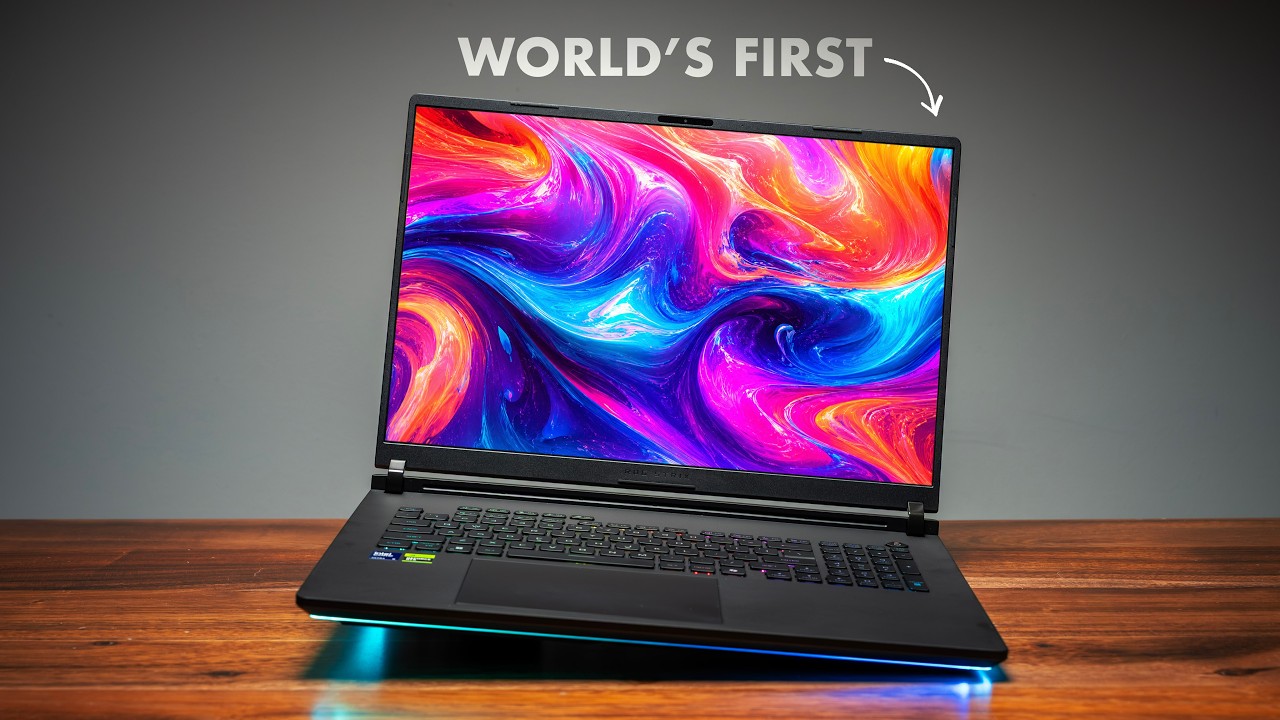
Acer Predator Helios Neo 16 AI Review – 1 of Only 2 That Can Take It
I've tested five laptops with Intel's Core Ultra 9 290HX Plus, the fastest CPU Intel puts in a gaming laptop right now, and three of those five got so hot it hurt my gaming. Only two could actually handle it, and this is one of them. It's not perfect, and I'll show you the one test where it got way too hot, but this is the Acer Predator Helios Neo 16 AI. It lists at $3,300 with an RTX 5080, and it's on sale at Micro Center right now for $2,800.
Quick Verdict
The Helios Neo 16 AI is a very capable gaming laptop. The full-power 175W RTX 5080 handles pretty much anything at 2560×1600, and, crucially, it keeps the 290HX Plus cool enough in games that I never got a single frame drop, which most 290HX Plus laptops I've tested couldn't do. The only other one that handled it fine was the ROG Strix SCAR 18. It's also priced a bit more aggressively than other 5080 laptops.
The trade-offs: for this money the chassis is mostly plastic, the speakers are weak, the keyboard has some quirks, battery life is short, and in an all-core Prime95 load the CPU sat at 104°C, right at Intel's limit. The 290HX Plus did fine here, but it runs too close to its limits for me to call it the smarter buy. I still think the 275HX is the sweet spot for this kind of chassis.
Price
That's a lot of money. Last year's Neo 16 topped out at an RTX 5070 Ti and sold for about $1,100 less. Part of that jump is the 5080, which you couldn't get in this laptop last year, and part of it is that prices on everything are going through the roof right now. Still, compared to other 5080 laptops, this one is priced a bit more aggressively. I wouldn't call it affordable, but it's on the more affordable side, especially at the current $2,800 sale price.
Design and Build
The chassis is the same as last year; what changed is inside: the 290HX Plus, the RTX 5080, and a screen that drops itself to 60Hz on battery. For $3,300, the chassis is mostly plastic: the bottom, the keyboard deck, and the bezel around the whole display are all plastic. Only the lid is metal, which is kind of disappointing at this price. It also picks up a lot of fingerprints, since there's no special coating to prevent them.
The upside is the weight: 5.35 lb, which isn't bad for a 16-inch gaming laptop.
The first thing I noticed when I opened it was the hinge. It's really good and reminds me a lot of the hinge on the MacBook Pro 16, which I didn't expect on a gaming laptop. Up top there's a 1080p webcam with Windows Hello facial recognition.
Ports
The ports are split all over the place:
- Left: Ethernet, USB-A, microSD card slot, headphone jack
- Right: two USB-A
- Back: HDMI, power connector, two USB-C (one is Thunderbolt 4)
The good news is that both USB-C ports support up to 100W charging, so you can leave the big brick at home if you're just working.
Display
Unfortunately, the display isn't OLED, which I think it should be at this price. Acer does sell an OLED version, but it only goes up to 165Hz, so for gaming the 240Hz panel might be the better option. And it's a really good IPS display:
| Display (240Hz IPS) | Result |
|---|---|
| Resolution | 2560×1600 |
| SDR brightness (measured) | just under 650 nits (Acer advertises 500) |
| sRGB / DCI-P3 | 100% / 97% |
| Delta E average | 1.29 |
If you edit photos or video on the side, the colors are accurate right out of the box. Viewing angles are just okay, and next to an OLED you'd see a huge difference, but it's a matte display, so reflections aren't a problem.
Keyboard, Touchpad, and Speakers
Yes, the keyboard has RGB, but it's four-zone, not per-key. The keys have 2mm of travel and a deep actuation, but they feel quite soft in the middle when you press down. When I'm gaming, if I'm holding two keys and hit a third, sometimes it doesn't register. The right Shift key is about half the size of a normal one, and since I use that key a lot, I keep hitting the arrow key by accident. At least you get a numpad for those who want one.
Sticker placement: there are three of them, and the two sitting side by side are crooked. The sticker guy is out of control again. There's also a stamp on the other side that takes up the entire side of the deck.
The touchpad is a good size, glass, and mechanical, and I have no complaints about how it works.
The speakers are another story. There are only two, and they fire down from the bottom of the laptop, which isn't a great spot. I get it: it's a gaming laptop, the fans will ramp up, and you'll probably have headphones on. But Acer has never been great at speakers. At max volume they're clear and get quite loud, but there's zero bass; it's all treble.
CPU Performance
Performance is where you want your money going on a laptop like this, and against a lot of other laptops, including ones that cost more, it holds up really well.
- Cinebench 2026 multi-core: 8,921, higher than the ROG Strix SCAR 18 with the 275HX and last year's Omen 16. I'm seeing about 16% more multi-core and 17% more single-core performance.
- Because it's an HX chip, it clobbers Panther Lake Core Ultra 9 386H laptops by about 75% in multi-core.
- Speedometer: 47.8, well ahead of the SCAR 18 and one of the best Windows HX results I've had on a gaming laptop this year. Day to day it's really snappy.
Acer is pushing a lot more power into this CPU, and the downside is battery life. This is a gaming laptop first and everything else second.
Gaming
| Game | 2560×1600 High | + DLSS | 1920×1200 | + DLSS |
|---|---|---|---|---|
| Cyberpunk 2077 | 105 FPS | 118 FPS | 128 FPS | 144 FPS |
| Black Myth: Wukong | 77 FPS | 106 FPS | 102 FPS | 129 FPS |
| F1 25 | 192 FPS | — | — | — |
| Doom | — | 70 FPS | — | — |
At native resolution the 5080 handles pretty much anything, and you can push the settings higher and still have a good experience. If you play heavier games, 1200p is a great option. It also beat the ROG Zephyrus Duo with an RTX 5090 in both Steel Nomad and Time Spy.
Thermals: Warm, but Stable
The problem I had with the other 290HX Plus laptops was heat. On a lot of them, I'd load up Overwatch and the CPU would hit 100–101°C and just sit there, and my frames would drop all the time. This one doesn't. It hits those numbers a couple of times and comes right back down, and I didn't get a single frame drop.
In a 20-minute F1 25 loop:
- CPU: averaged around 82°C for the whole run, with a couple of brief spikes up to 104°C.
- GPU: averaged 171W of its 175W, peaked at 176W, and its clock speed never dropped. In 3DMark it held a total of 173W.
- GPU temperature: 81–83°C, about 4–6°C under its 87°C thermal limit. I'd have loved to see it under 80. It's not throttling, but it isn't a cool laptop either. I'd call it warm, but stable.
Acer has a few things helping here. One of the two fans is its 5th-gen AeroBlade 3D metal fan, the heat pipes are rectangular so they cover more area (Acer says that adds 9% more capacity), and there's liquid metal on the CPU.
The one test where it got way too hot
In Prime95, which loads every core at once, the CPU sat at 104°C for the whole run. That's ridiculously hot, right at Intel's limit. Technically it was thermal throttling the entire time, but it held about 124W and the clocks only dropped about 2%, so you're barely losing any performance. Most people will never push a laptop like that, but if you're that person, this thing will get hot, and it's a little too hot for my comfort.
Creative Work and Local AI
| Test | Result |
|---|---|
| Blender | ~11% faster than the Zephyrus G16 (same RTX 5080, but the Helios gives it the full 175W) |
| Premiere Pro (PugetBench) | ~122,000, basically tied with the SCAR 18 and ahead of the Zephyrus G16 |
| DaVinci Resolve | ~103,000, a bit behind the Zephyrus Duo (which has a 5090) |
| Photoshop | ~11,000 (MacBook Pros are still at the top, but it's totally fine for photo editing) |
For local AI, I ran llama-bench with a 9-billion-parameter model, so the whole thing fits on the GPU. It generated 102.7 tokens/s versus 85.9 on a MacBook Pro with an M5 Max. The catch is that the 5080 only has 16GB of VRAM, so the Mac can run much bigger models that just won't fit on this.
Inside and Upgradeability
Getting inside is super easy. There's no vapor chamber, but there's a lot of copper, the fans are quite big, and the cooling seems good.
- Wi-Fi: still the same Wi-Fi 6E card as last year, but it's swappable, so you can put in Wi-Fi 7.
- Storage: two drive slots, one populated with a 1TB Gen 4 SSD with good read and write speeds.
- RAM: upgradeable, with two 16GB DDR5-6400 sticks.
Battery Life
It has a 92Wh battery, and in my PCMark Modern Office test I got 5 hours 33 minutes. Again, this is a gaming laptop first.
Software
PredatorSense 5.0 is where you change performance modes. I like to leave it on Turbo with the fans on Auto for the best performance. Unplugged, you can't use Performance or Turbo, only Balanced or Eco.
It has a MUX switch like most gaming laptops these days. If you set it to NVIDIA GPU only, or switch back, you'll need to restart. But it also has Advanced Optimus, which switches GPUs on its own without a restart, so most people can just leave it on that.
The Bottom Line
The 290HX Plus performed really well in here, but it's still a very hot CPU, and I'm not 100% comfortable with it. The 5080 is great, and for the price you get a reasonable amount of laptop for your money. Is it the nicest-looking laptop at this price? Obviously not, but I'm really happy to see a laptop keep this CPU relatively cool, because most of the others I tested couldn't. The only other one that handled it fine was the ROG Strix SCAR 18.
If you're thinking about buying this one, I still think the 275HX is the sweet spot for this kind of chassis. The 290HX Plus did fine here and didn't get overly hot in games, but it runs too close to its limits for me to call it the smarter buy.
Sponsored: Proton Mail
This video was sponsored by Proton Mail.
Most of my emails are brands pitching me stuff to review, and some of them know exactly when I open them, because there's a tiny tracker hidden inside that reports back. Here in Canada, a lot of us are trying to rely less on US companies, and email is a big one. Your inbox is in the hands of US big tech. You didn't choose that, but you can change it.
Proton Mail works differently. Everything in your inbox is protected with zero-access encryption, so not even Proton can read it. There are no ads and no profiling, and it blocks trackers and cleans tracking links out for you. Leaving Gmail doesn't have to happen overnight: open Easy Switch in Settings and connect your Gmail account, and you can send and receive messages from one secure place, so you don't miss anything while you move over.
🔒 Get your free Proton Mail account at proton.me/matthew
Where to Buy
- Acer Predator Helios Neo 16 AI — On sale for $2,800 at Micro Center
This video was sponsored by Proton Mail.
Affiliate Disclosure: This article contains affiliate links. If you purchase through these links, we may earn a commission at no extra cost to you.
Published: November 2026