Lenovo Legion 9i (2026) Review: Almost Perfect — And Why You Should Skip the Pricier Chip
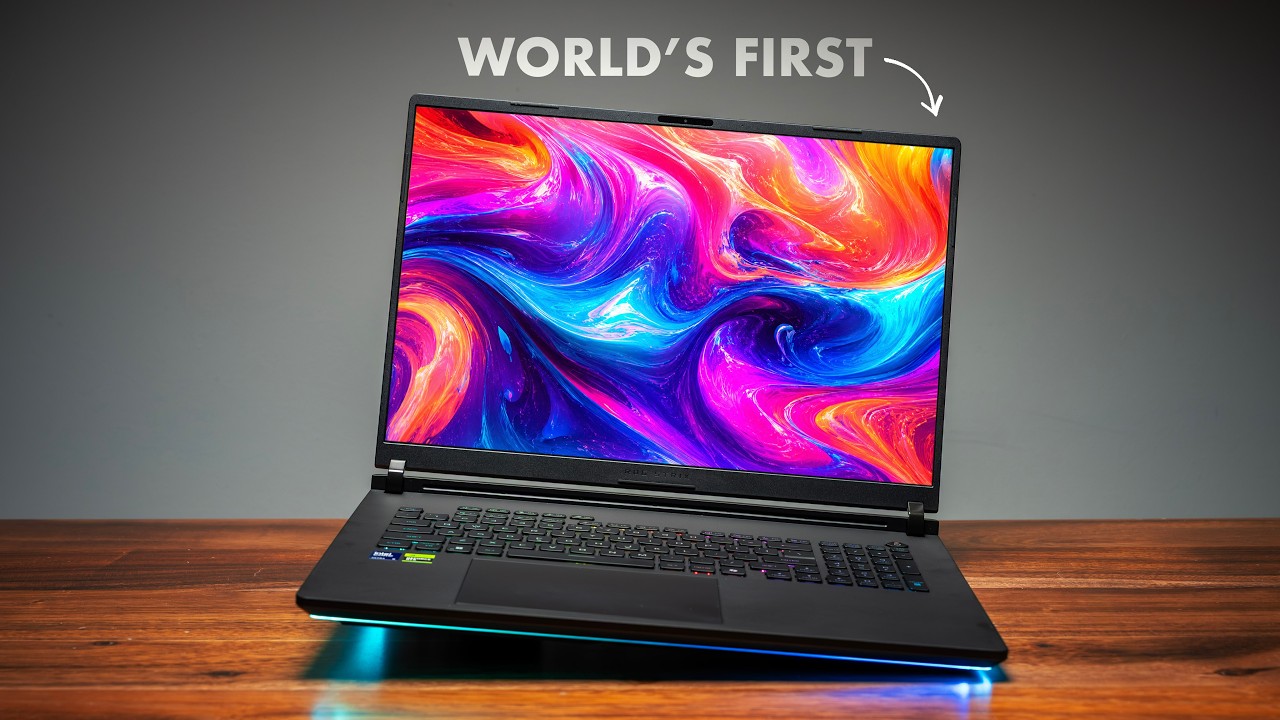
This is the 2026 Lenovo Legion 9i, specced with a beefy Intel Core Ultra 9 275HX, and honestly it might be the best-looking 18-inch gaming laptop you can buy right now. But there's a version of it I'm going to tell you not to buy — and the benchmarks back that up in a way I genuinely didn't expect when I started testing. Lenovo and Intel sponsored this video, but I've been running this thing through everything for the last week, and some of what's in here is amazing.
Quick Verdict
The Legion 9i is a beautiful monster of a desktop-replacement laptop, and I have no problem recommending it — with one important caveat. Get it with the Intel Core Ultra 9 275HX, not the optional 290HX Plus. The cheaper chip actually wins in the sustained creative workloads you'd buy this for (Photoshop, Premiere), because the more expensive 290HX Plus runs hot and throttles right when you need it. Pair that with an RTX 5090, a genuinely clever dual-native 18-inch display, a stunning forged-carbon build, and surprisingly good ~7-hour battery life, and the 275HX configuration is the complete package. And since the 2026 model is nearly identical to late-2025, grab a cheaper 2025 unit if you can find one.
What Actually Changed for 2026
Here's what you need to understand: there's basically no difference between the 2026 and 2025 models except one thing. Same 192GB RAM ceiling, same drives, same ports, same display options, same keyboard, even the same generation number (10). The single change is an optional new CPU — the Intel Core Ultra 9 290HX Plus. Which matters, because as you'll see, that optional chip is the one part I'd tell you to avoid.
Design and Build
This is the laptop you buy when you want to move around a little but want the closest thing to a desktop replacement you can actually carry. So yes, it's heavy — 7.72 lb, or 8.27 lb with the 3D display option — and you feel that pulling it out of a bag. But that weight buys proper performance and the biggest display you can get on a laptop.
It doesn't look like anything else on the market. Aluminum top and bottom, but the lid is forged carbon that feels almost soft-touch — and my favorite fact: the carbon pattern is different on every single Legion 9i. Line up five of them and the speckles sit in different spots on each one. Yours is literally one of a kind.
The hinge is one of the best I've ever used — no wobble, no flex, one-hand open, rock solid, and it lays nearly flat so you can slide it under a monitor. You get a full-size keyboard with a numpad, per-key RGB, ~1.6mm of travel, and Lenovo's recessed keycaps that feel great to type on (it's not mechanical). No fingerprint scanner, but Windows Hello facial recognition handles login. The touchpad is mechanical, not haptic — at this price I'd love haptic, but most of you are docking this on a desk anyway, so it's a minor nitpick. The power button up top changes color with your performance profile (note: unplugged you're limited to quiet/balanced; plug in for performance and custom modes).
Being big, it has ports for days: on the left, one USB-A, a 2.5GbE jack (be gentle, those can snap), two Thunderbolt 5 ports, and a combo audio jack. On the back, power and HDMI. On the right, two USB-A, a full-size SD card slot, a 10Gbps USB-C (not Thunderbolt), and a webcam kill switch.
The Display: A Clever Dual-Native Panel
This is the most interesting part of the whole laptop. It's a dual-native 18-inch panel — flip a setting and it physically switches between 4K at 240Hz and Full HD+ at 440Hz. Best of both worlds. Gaming at 440Hz feels incredible; you know the jump from 60 to 120? This is that same leap going from 144 to 440. And because Full HD+ is native, text actually looks great — not as razor-sharp as native 4K, but genuinely good.
The catch: it's an IPS panel, not OLED or mini LED, so peak brightness and response time (around 7–8ms) can't match those. But here's what people miss — SDR brightness hits about 573 nits, which is really bright for IPS, so in real use it holds up far better than it sounds. It supports HDR, but peak brightness is a bit too low to call it true HDR.
Two software annoyances: the toggle to switch refresh/resolution modes is buried in Legion Space (hover over the HSR option), and the MUX switch between hybrid and dedicated GPU needs a restart. Hopefully Lenovo surfaces these better. There's also a niche 3D display option for 3D artists — not for me, but it earns its keep if that's your work (at the cost of more weight).
Six speakers get loud enough to basically drown out the fans while gaming. Speaking of which, fan noise tops out at ~58dB in extreme mode (lower than many laptops that exceed 60), and ~53dB in performance mode where I live most of the time — very respectable for an 18-inch machine.
Performance: The Cheaper Chip Wins Where It Counts
This is where it gets interesting. The tested SKU is the Core Ultra 9 275HX (out since last year, so we know it well) plus an RTX 5090, an 18-inch variable display, and a 1TB NVMe SSD. I also threw in a laptop running the newer 290HX Plus to compare.
On paper, the expensive chip wins the synthetics:
| Test | 275HX (Legion 9i) | 290HX Plus |
|---|---|---|
| Cinebench R26 multi-core | 7,317 | ~9,000 |
| Cinebench R26 single-core | 526 | 568 |
| Firefox compile | 27 min | 20 min |
| Speedometer | — | wins |
But then you get to the apps people actually buy this for:
| Test | 275HX (Legion 9i) | 290HX Plus |
|---|---|---|
| Adobe Photoshop | 11,426 | ~10,000 |
| Premiere Pro | 128,214 | a bit lower |
The cheaper chip wins the sustained creative workloads. (One caveat: my 290HX Plus comparison unit is in a smaller 16-inch Legion Pro 7i chassis, so the 290HX Plus inside the 9i's bigger chassis might tell a different story.) GPU-wise it's a monster — Steel Nomad and Time Spy are neck-and-neck between the two, and Blender flies. The RTX 5090 is never the bottleneck.
Why skip the 290HX Plus? I haven't tested it in this exact machine, but I've tested it in three other laptops plus seen reviews: that chip runs hot. The 275HX here sits in the low 90s°C — totally fine. The 290HX Plus under sustained load hits 100–103°C and throttles itself right when you need it most. That's exactly why the cheaper chip beats it in Photoshop and Premiere. If you do short bursty work, sure, the 290HX Plus is powerful — but for consistent gaming or sustained creative grinding, the 275HX gives you more real-world performance for less money. For the spec nerds: the GPU happily sits near 175W, core clocks stay high, and the CPU can spike past 200W before settling into the 170s.
Battery and Real-World Stress Test
Battery life surprised me — I didn't expect more than 3 hours, but it got almost 7 hours of general use. You're not buying this to be unplugged all day, but you can absolutely get productivity done off the charger.
Here's the test I actually care about, because it's why you buy the bigger chassis: I loaded OBS and started recording, fired up Marvel Rivals, kept Edge open with a pile of tabs, and then started rendering a nasty layered 4K project in DaVinci Resolve — all at once. I was still getting over 80 FPS in-game. The frames dipped 20–25 FPS when the render kicked in, but gameplay stayed smooth the entire time, recording and rendering simultaneously. That's what this CPU + GPU + bigger chassis is truly for.
For straight gaming: drop to sensible settings and it'll do 4K; want max frames, switch to Full HD+ at 440Hz (my personal favorite); want a middle ground, QHD looks better and caps at 240Hz. Marvel Rivals looks gorgeous, Overwatch is flawless, and something brand-new and demanding like Pragmata looks beautiful with a little DLSS Super Resolution.
Internals
The internals are insane: a huge vapor chamber up top, four fans (two big, two small), a swappable Wi-Fi 7 card, and four RAM slots (64GB in my unit, up to 192GB). There's a 99Wh battery — the legal carry-on limit — and the coolest part is storage: three NVMe SSD slots under one cover (all up to 2280) plus a fourth that gets great read/write speeds. If you work in Unreal Engine, this laptop is made for it.
Who Should Buy It
- Gamers or creators who want a movable desktop replacement — one of the most complete 18-inch machines out there. Just get it with the Core Ultra 9 275HX.
- 3D artists who need the specialized display — the one niche where the 3D option earns its keep.
- Bargain hunters — since the 2026 model is nearly identical to late-2025, if you can find a 2025 unit cheaper, buy it. It's the same laptop overall.
The Legion 9i is a beautiful monster, and with the right chip it's almost perfect.
Where to Buy
This was a sponsored review — Lenovo and Intel partnered on this video.
Affiliate Disclosure: This article contains affiliate links. If you purchase through these links, we may earn a commission at no extra cost to you.
Published: June 2026