Bigger IS Better
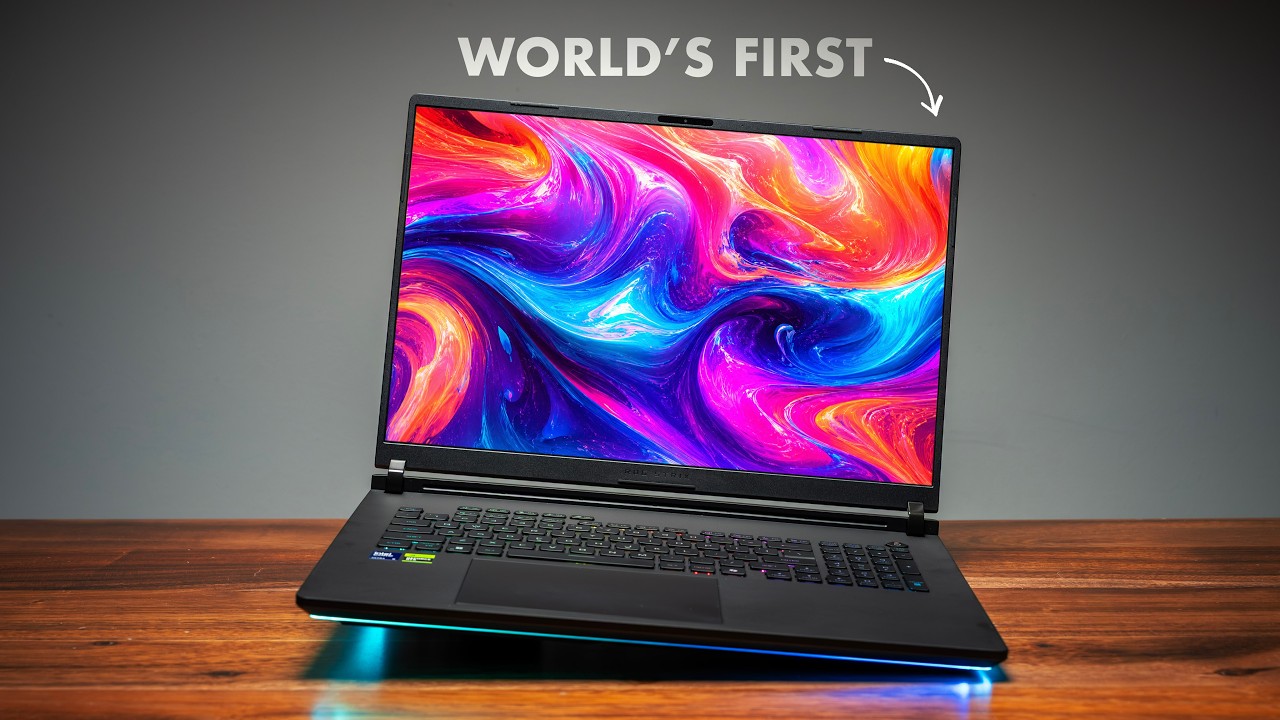
Desktop replacements come in two philosophies: maximize performance in minimal space, or embrace size for maximum capability. The Gigabyte AORUS Master 18 (2025) chooses the latter. At 7.2 lbs (3.27 kg) with Intel Core Ultra 9, NVIDIA RTX 5090, 64GB DDR5, 2TB storage, and an 18-inch Mini LED 4K 144Hz display, this proves bigger IS better.
At $3,999, this is a desktop replacement that doesn't apologize for its size.
Performance: RTX 5090 Desktop Replacement
The Intel Core Ultra 9 and RTX 5090 deliver desktop-class performance.
RTX 5090 at Full Power
The 18-inch chassis allows higher power limits for the RTX 5090:
Gaming Performance (4K):
- Cyberpunk 2077: 95-120 FPS Ultra
- Baldur's Gate 3: 110-145 FPS Ultra
- Call of Duty: 200+ FPS High
- Fortnite: 300+ FPS Epic
The larger chassis allows better cooling, unlocking more RTX 5090 performance.
Ray Tracing (4K):
- Cyberpunk RT Overdrive: 75-100 FPS with DLSS
- Portal RTX: 100-130 FPS
- Control Max RT: 115-150 FPS
Content Creation:
- 8K video editing: Smooth
- Blender: Desktop-class rendering
- Unreal Engine 5: Full capability
The 64GB DDR5 RAM handles anything. The 2TB PCIe 4.0 SSD provides massive storage.
Display: Stunning 18" Mini LED 4K 144Hz
The 18-inch Mini LED 4K (3840x2160) display with 144Hz refresh is exceptional:
- Size: 18 inches is massive
- Resolution: True 4K sharpness
- Mini LED: Deep blacks, high contrast
- Brightness: 600+ nits peak
- Refresh rate: 144Hz (sweet spot for 4K)
- Color: 100% DCI-P3
Massive Gaming Canvas
The 18-inch display is immersive:
- Large workspace: Desktop-like space
- 4K clarity: Pixel-perfect detail
- 144Hz smooth: Excellent for gaming
- Mini LED beautiful: Stunning visuals
For gaming and creative work, this display excels.
Build Quality: Desktop Replacement Tank
At 7.2 lbs (3.27 kg), this is one of the heaviest gaming laptops.
Design
Gigabyte's design is aggressive:
- Large robust chassis
- Gaming aesthetics
- RGB lighting
- Massive cooling vents
This screams desktop replacement.
Build Impressions
The build is tank-like:
- Extremely rigid
- Quality materials
- Over-engineered cooling
- Feels indestructible
Keyboard and Trackpad
The keyboard offers:
- Per-key RGB
- Good travel
- Number pad
- Macro keys
Port Selection
Extensive:
- 2× Thunderbolt 4
- 4× USB-A 3.2
- 1× Mini DisplayPort
- 1× HDMI 2.1
- 1× SD card reader
- 1× Ethernet (2.5Gb)
- 1× 3.5mm audio
Comprehensive connectivity.
Battery Life: Plugged-In Machine
The 99Wh battery with RTX 5090 provides:
- Light use: 4-5 hours
- Gaming unplugged: 1-1.5 hours
This is meant to stay plugged in.
Charging
Dual power bricks (330W each) for maximum power delivery. This is extreme.
Thermal Management: Bigger Allows Better
The 18-inch chassis provides cooling advantages:
- Under gaming: Hot but controlled, fans loud but not excessive
- Better than 16-inch: More cooling headroom
- Sustained performance: Maintains high performance longer
The size allows better thermals than smaller RTX 5090 laptops.
Why 18-inch?
Advantages:
- Better cooling
- Larger display
- More upgrade space
- Desktop replacement feel
Disadvantages:
- Very heavy
- Not portable
- Large footprint
- Expensive
Who Should Buy This?
The AORUS Master 18 is for:
- Desktop replacement users
- Maximum performance seekers
- Users who rarely move laptop
- Those who want largest display
Skip if you:
- Need portability
- Want something reasonable to carry
- Have desk space limits
Comparison to 16-inch RTX 5090
vs 16-inch RTX 5090 laptops:
- Master 18: Better cooling, larger display, heavier
- 16-inch: More portable, similar performance
The 18-inch makes sense if portability isn't a priority.
Verdict
The Gigabyte AORUS Master 18 (2025) proves bigger IS better for desktop replacements. The RTX 5090 performs better with more cooling. The 18-inch 4K 144Hz Mini LED display is stunning. The 64GB RAM and 2TB storage handle anything.
At 7.2 lbs, this isn't portable. But as a desktop replacement that can be moved between locations, it excels.
$3,999 is expensive, but less than comparable Razer/ASUS 18-inch models.
Bigger IS better. If you want maximum gaming laptop performance and don't need portability, the Master 18 delivers.
Frequently Asked Questions
Q: How portable is it really? A: Room to room fine. Daily commute? Too heavy. This is desk-to-desk portable, not daily carry.
Q: How does RTX 5090 perform vs smaller laptops? A: About 5-10% better due to better cooling and higher power limits.
Q: Is 18-inch too big? A: For desktop replacement, no. For actual portability, yes.
Q: Can I upgrade components? A: Yes! RAM, storage, WiFi all upgradeable. CPU/GPU soldered.
Q: Why dual power bricks? A: RTX 5090 and Core Ultra 9 at full power need massive wattage. Dual bricks provide it.